Annotations in Java
Annotations in Java :
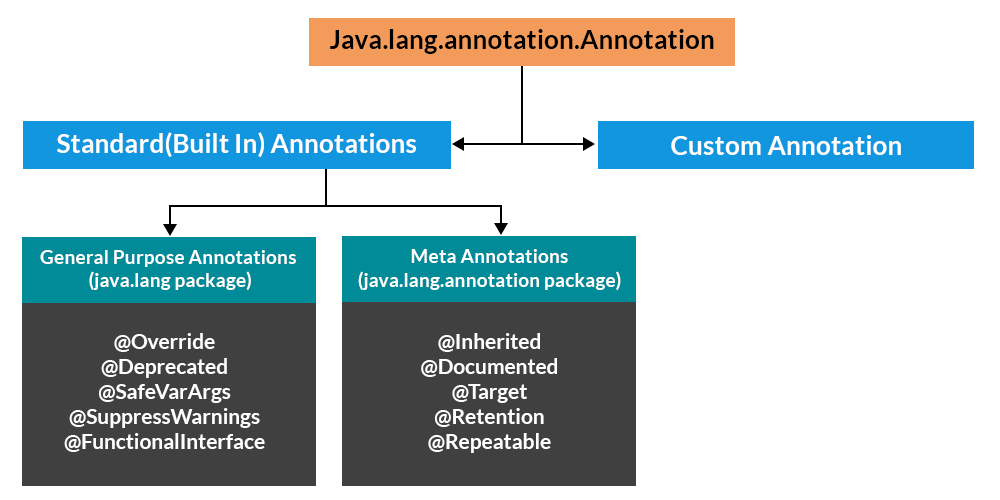
Annotations are used to provide additional information about a program.
- Annotations start with @
- Annotations do not change the action of a compiled program.
- Annotations help to associate metadata (information) to the program elements i.e. instance variables, constructors, methods, classes, etc.
- Annotations are not pure comments as they can change the way a program is treated by the compiler.
- Annotations basically are used to provide additional information, so could be an alternative to XML and Java marker interfaces.
Example 1 :
package java;

public class ann {
public void display(){
    System.out.println("hell0 children");
}
}

 class ch1 extends ann{
     @Override
     public void display() {
         super.display();
        // System.out.println("hello");
     }


     public static void main(String[] args) {
         ch1 c1 = new ch1();
         c1.display();

         @SuppressWarnings({"deprecated","unused"})
                 int x;

     }
}
Example 2 :
package javainheritance;

public class ann2 {

    public void display(){
            System.out.println("hell0 children");
        }
    }

    class ch extends ann2 {
        @Override
        public void display() {
            super.display();
            // System.out.println("hello");
        }

        void cal(){
            System.out.println("calculate");
        }

        public @interface myann{

            int age() default 18;
            String name();
        }

            @myann(
                    name = "akshay",age = 22
            )


        public static void main(String[] args) {
           ch n = new ch();
            n.display();


            @SuppressWarnings({"deprecated","unused"})
            int x;
            n.cal();
                System.out.println();

        }
    }
Comments
Post a Comment